1.4 First Java Program
In this section, we'll write a simple program that prints "Hello, World!" to the console—a classic first program for many languages. I remember writing my first "Hello, World!" in C Programming Language about 22 years ago, in 2002. The steps are straightforward: we'll write the code, compile it, and run it.
Ensure you have JDK installed (Oracle or OpenJDK) and a text editor or IDE; refer to previous sections for setup details.
Step 1: Create a New Java File
- Open your text editor or IDE.
- Create a new file named
HelloWorld.java.
Step 2: Write the Code
Copy and paste the following code into your HelloWorld.java file:
// Define a public class named HelloWorld
public class HelloWorld {

    // The main method serves as the entry point for any Java application.
    public static void main(String[] args) {

        // Print the string "Hello, World!" to the console.
        System.out.println("Hello, World!");
    }
}
Java is an object-oriented programming language where classes serve as the building blocks. Each class contains attributes (data) and methods (actions). To create a program, define classes, write code in .java files, compile, and run using the Java Virtual Machine. Class names should start with a capital letter for clarity. Java supports key features like Encapsulation, Reusability, Abstraction, Modularity, and Polymorphism.
Code Breakdown
Let's breakdown our first class. The code execute and prints simple "Hello World" on console.
Class Definition: public class HelloWorld defines a class named HelloWorld. The keyword public is an access modifier that specifies the visibility of the class, indicating that it can be accessed from other classes. The general syntax for defining a class is <AccessModifier> class <ClassName> { // Code }.
Main Method: public static void main(String[] args) serves as the entry point of a Java program. Every Java application, except for libraries, must include at least one main method to execute. This method is where the program begins running, and the String[] args parameter allows the passing of command-line arguments to the application.
Printing to Console: System.out.println("Hello, World!"); is used to print a message to the console. This method outputs the specified text, in this case, "Hello, World!", allowing developers to display information and debug their applications effectively.
This simple example demonstrates the basic structure of a Java program. By understanding classes, methods, and the main method, you can begin building more complex Java applications.
Java keywords are reserved words that have a predefined meaning in the language. They cannot be used as identifiers (like variable or class names). Examples include:
- class: Used to define a class.
- public: An access modifier indicating that a class or method is accessible from other classes.
- static: Indicates that a method or variable belongs to the class, rather than instances of the class.
As of Java SE 17, there are 50 keywords essential for defining the structure and behavior of Java programs.
Step 3: Compile and Run the Program
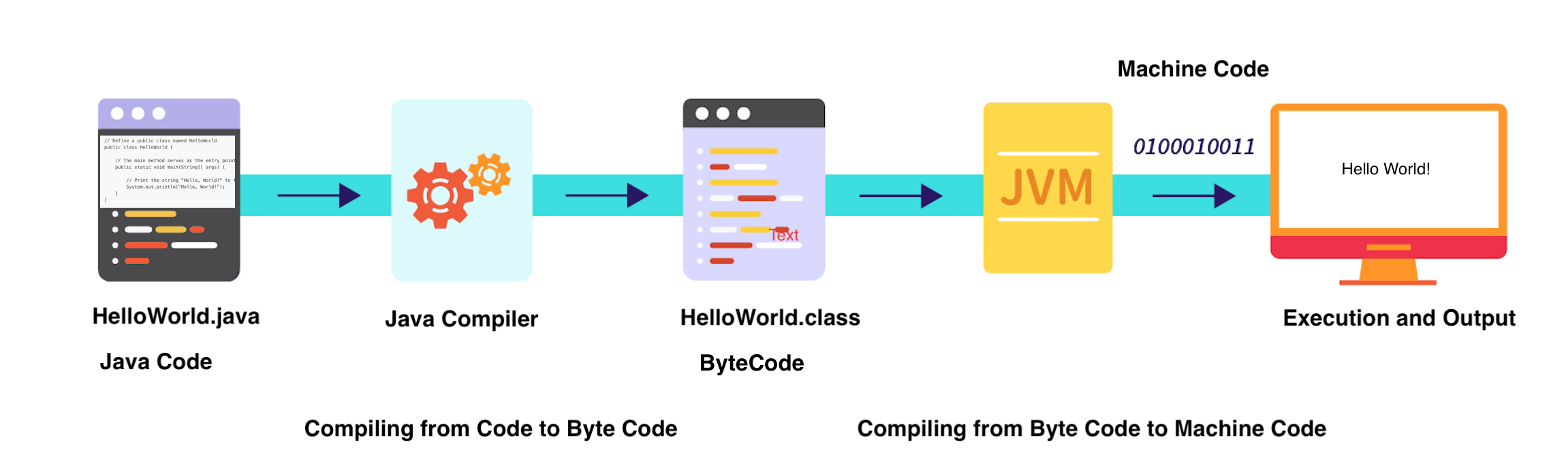
Java is a compiled language, meaning the code needs to be translated into a form the computer understands before it can run. Now that you've written your first program, let's compile and execute it!
- Open your terminal or command prompt.
- Navigate to the directory where your
HelloWorld.javafile is saved. You can use commands likecd(change directory) to navigate. - Compile the program. The specific command depends on your system setup, but it's typically
javac HelloWorld.java. This creates a file namedHelloWorld.class. - Run the program. Use the command
java HelloWorld.
Compile
javac HelloWorld.java
This command compiles your Java code. If there are no errors, it will generate a HelloWorld.class file.
Run
To run your program, type the following command in the terminal:
java HelloWorld
You should see the output:
Hello, World!
Conclusion
Congratulations! 🎉 You've just written and executed your first Java program. This simple exercise introduces you to Java syntax and the structure of a Java application. As you continue learning, you'll discover more complex concepts and features. Happy coding! 🚀